The obvious approach to rich text formatting was to store entries as HTML. Proper tags, a proper renderer. Text that is actually bold, not just displayed as bold.
The question that stopped it was simple: is this a high risk change?
The answer was yes. Converting to HTML storage means every entry already in the app becomes a potential casualty. One bad migration and someone’s records, the small wins, the good days, the things they wanted to remember, are corrupted or gone. That felt unacceptable.
So a different approach: keep a plain TextInput, store the text exactly as the user types it, and render markdown on display. Existing entries are completely safe. They contain no markdown syntax, so they just look the same as before. The risk question, asked before a single line of code was written, shaped the whole architecture.
If you know, you know
With the approach decided, formatting worked, but silently. Type **bold** and the saved entry renders it bold. Type nothing special and everything looks exactly as it always did.
There was no UI pointing at any of this. No hint that formatting was possible. If you happened to know markdown syntax you’d discover it. If you didn’t, you’d never know the capability existed.
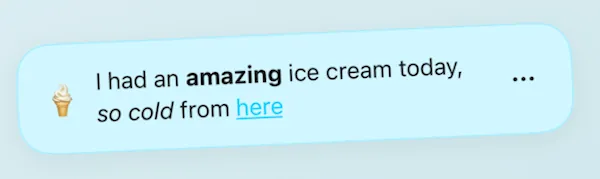
That felt acceptable for a moment. Did It isn’t a document editor, and not every feature needs a sign. But it nagged. The capability was there and most people would never find it.
Teach someone to fish
The next step was the Aa pill, a small collapsible element that sat in the text field. Tap it and a syntax reference appeared: **bold** | *italic* | ~~strike~~ | [text](url). Everything you needed to format an entry, shown as you typed.
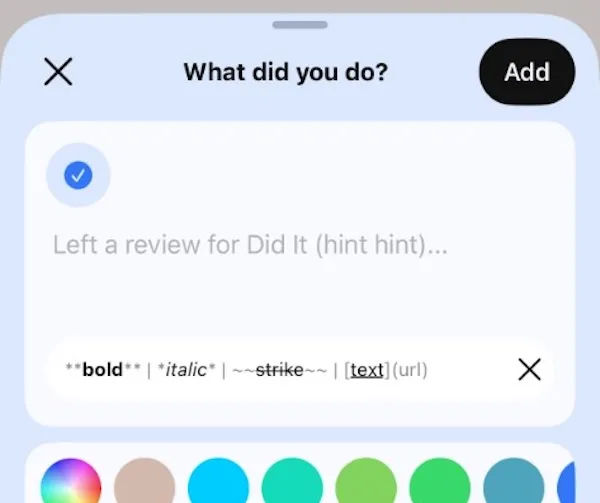
This immediately created a layout problem. Anchoring it inside the bottom of the text field meant fixing the height of that field, which conflicts directly with a text area that should grow with content. So it moved up, to sit inline with the emoji icon selector at the top, adding no extra height at all.
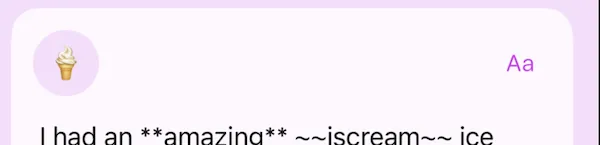
The presentation of the bar needed work too. An early version showed the syntax in plain text, so it read as a list of symbols rather than a demonstration of what those symbols do. The fix was to render each example as it would actually appear: actual bold next to the syntax for bold, actual strikethrough next to the syntax for strikethrough. A close icon was slightly too large. The animation came from the wrong edge. The background took a few attempts to stop feeling heavy, eventually settling at 50% opacity. A placeholder link in the reference was changed to did-it.co so tapping it went somewhere real.
Each of these is small. Cumulatively they took a while.
Then a different question
At some point the question shifted from “how do we teach markdown?” to “why are we teaching markdown at all?”
The syntax reference was still asking something of the user. Friendlier than nothing, but it still required you to learn that ~~ means strikethrough, remember it, type it accurately. Fine if you write markdown regularly. Friction if you don’t.
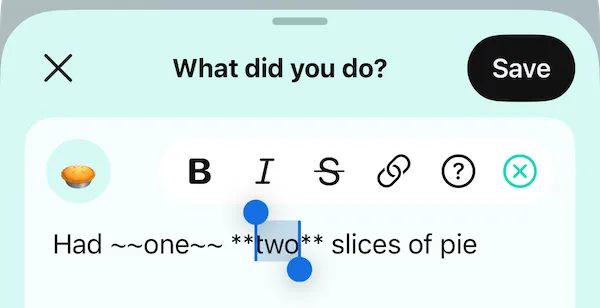
The formatting buttons removed the question entirely. Select some text, tap B, it’s bold. The markdown is written underneath and **bold** is still what gets stored, but the app writes it, not the person. There’s one moment where the seam shows: when you tap a format button, you briefly see the syntax wrap your selected words before you save. On save, it renders. It’s a small glimpse behind the curtain, but it doesn’t feel wrong. It’s honest about what’s happening underneath.
Nobody needs to know the syntax exists, but if they catch a glimpse, it’s not a mystery.
One more edge case
Links needed a small extra thought. Markdown links require a properly formatted URL. Without https:// in front, the link fails silently. The obvious solution would be to enforce the format in the input, or show an error if it’s missing. Neither felt right.
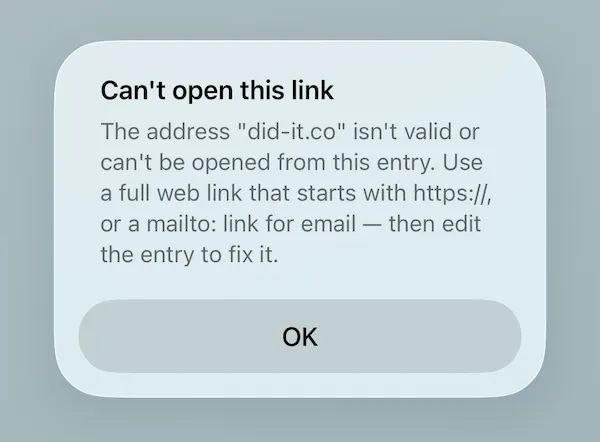
Instead, the app listens for a tapped link and if it fails, immediately retries with https:// prepended. Only if that second attempt also fails does it tell the user something is wrong. No format enforcement, no error on the first try. Just a quiet retry that handles the most common mistake without drawing attention to it.
It’s a small thing, but it reflects the same instinct as the decision at the start: find the least disruptive path, and only ask something of the user when there’s genuinely no other option.
The thing that moved
What changed across these sessions wasn’t really the UI. It was the assumption about who the user is.
The silent markdown assumed a user who already speaks the syntax. The reference bar assumed a user willing to learn it. The formatting buttons assume a user who just wants their text to look right and handles the rest invisibly.
That assumption is almost certainly closest to the truth. And it started with a question asked before any code was written: could this damage what people have already saved?
The answer shaped everything that followed.